Blocky Pipeline: Build Your Own Stage Sequence
Code: github.com/wanleung/ai-dev-team
In short: Standard mode and TDD mode cover most use cases, but sometimes you want a custom sequence — run two review loops in a row, skip deployment tests, or run a domain-specific agent you added yourself. This post covers
pipeline.yaml: a separate config file that lets you define any stage sequence with explicit loop blocks, and a drag-and-drop GUI that builds it without hand-editing YAML.
After building the stage registry for TDD mode, the logical next question was: if stages are just names in a list, why not let users define their own list?
The pipeline.yaml format
stages:
  - pm
  - pm_reviewer
  - architect
  - loop:
      max: 3
      until: APPROVED
      stages:
        - architect_reviewer
  - junior_engineer
  - loop:
      max: 5
      until: APPROVED
      stages:
        - senior_engineer
        - reviewer
  - qa_planner
  - qa_engineer
  - test_runner
  - summariser
Plain stages are names from the registry. Loop blocks repeat their inner stages until a reviewer verdict matches until, or until max iterations are exhausted.
If pipeline.yaml exists in the project root, it fully replaces pipeline.mode from config.yaml. If it doesn’t exist, the pipeline behaves exactly as before. Backward compatible — no existing config breaks.
Loop blocks
The loop is the interesting part. Without it, a custom stage list is just reordering — you can do that with pipeline.mode: tdd. Loops let you express iterative review patterns:
- loop:
    max: 3
    until: APPROVED
    stages:
      - junior_engineer
      - code_reviewer
This runs engineers, then the code reviewer. If the reviewer approves, the loop exits. If it requests changes, the loop reruns — engineers see the reviewer’s feedback via PipelineResult, revise the code, and the reviewer judges again. Up to max times.
The until field is the exit condition. Three values are valid:
Value When the loop exits APPROVED Reviewer gave a clean pass NEEDS_REVISION Reviewer found issues (exit on failure, for early-stop patterns) CHANGES REQUESTED Code reviewer returned a changes-requested verdict
last_verdict on the result object is normalised to one of these strings by the reviewer stages. The loop compares result.last_verdict == stage.loop_until after each full iteration.
The single source of truth
Every valid stage name comes from _make_stage_registry() in the orchestrator:
def _make_stage_registry(self) -> dict[str, PipelineStage]:
    return {
        "pm": PipelineStage(...),
        "pm_reviewer": PipelineStage(...),
        "architect": PipelineStage(...),
        "architect_reviewer": PipelineStage(...),
        "junior_engineer": PipelineStage(...),
        "senior_engineer": PipelineStage(...),
        "reviewer": PipelineStage(...),
        "qa_planner": PipelineStage(...),
        "qa_write": PipelineStage(...),
        "qa_engineer": PipelineStage(...),
        "test_fix": PipelineStage(...),
        "deploy_tester": PipelineStage(...),
        "deploy_fix": PipelineStage(...),
        "summariser": PipelineStage(...),
    }
The _load_pipeline_yaml() validator checks every stage name against this dict and rejects unknown names immediately:
ValueError: Unknown stage 'code_reviewer' in pipeline.yaml.
Valid stages: pm, pm_reviewer, architect, ...
When a new agent is added to the registry, it automatically becomes available in pipeline.yaml and in the GUI palette. No other file needs updating.
The GUI builder
Editing YAML by hand is fine for developers who know the stage names. It’s not fine if you’re experimenting with different review loop configurations, or if you’re sharing the tool with someone who isn’t comfortable with YAML.
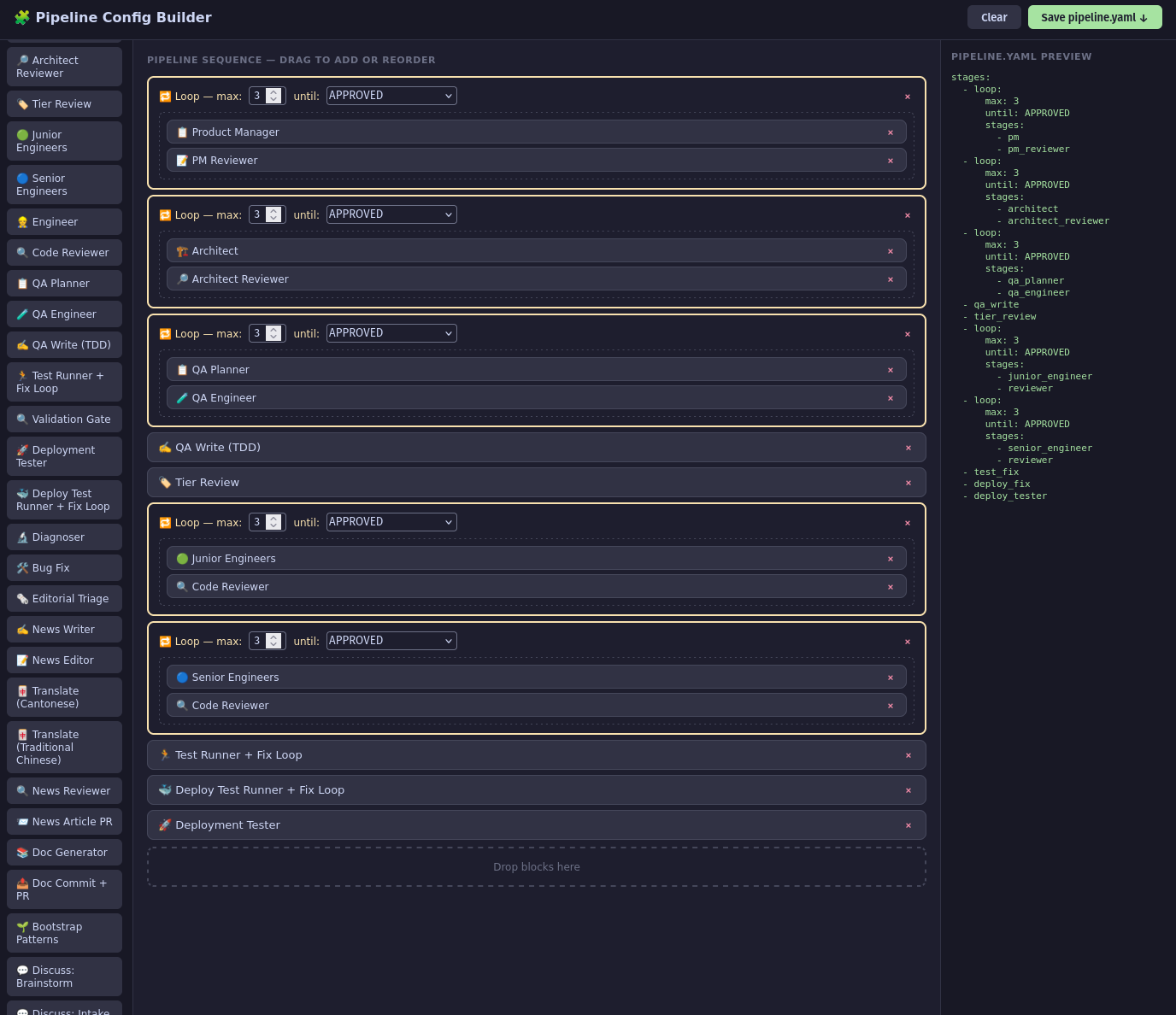
python main.py --config-builderThis launches a local HTTP server (OS-assigned port, printed to console) and opens a drag-and-drop editor in the browser:
Pipeline Builder running at: http://127.0.0.1:54321
Open in browser to edit pipeline.yaml
The interface has two areas:
Palette (left) — every stage from the registry, colour-coded by category: input stages (blue), review stages (amber), engineering stages (green), QA stages (purple), infrastructure stages (grey). A special “Loop” block is always in the palette.
Canvas (right) — your current pipeline sequence. Drag from palette to add, drag to reorder. Click a Loop block to configure max, until, and inner stages (which are their own drag-and-drop canvas).
The Save button writes pipeline.yaml to your project root. The Load button reads the current file so you can continue editing an existing config.
No token needed
One decision: --config-builder exits before the token check. The original flow was:
parse args → check GITHUB_TOKEN → create orchestrator → runThe config builder doesn’t make any API calls — it just serves a local web page and writes a file. Requiring a valid GitHub token to run it was a pointless gate. The handler exits right after launching the server, before the token check.
This means you can run the GUI on an air-gapped machine to prepare a config file, then copy it to the deployment environment.
The lambda closure problem
Building a parser that returns PipelineStage objects from YAML names is straightforward. The first implementation did it directly — _load_pipeline_yaml() looked up each name in _make_stage_registry() and returned a list of PipelineStage objects.
This introduced a subtle bug. The fn lambdas in the registry close over self:
"pm": PipelineStage(
    fn=lambda r: self._stage_pm(r, r.requirement),
    ...
)
from_config() is a classmethod. To validate a pipeline.yaml, it built a stub Orchestrator via __new__ (with agents set to None) just to call _make_stage_registry(). The returned PipelineStage objects had fn lambdas that closed over the stub — so if those stages ever ran, self._stage_pm would call None.run() and crash.
The fix: _load_pipeline_yaml() returns raw data — a list of strings and dicts, exactly as parsed from the YAML. The PipelineStage objects are resolved from the real orchestrator’s registry at runtime, inside _build_stage_list(). The stub is only used for name validation, never for stage construction.
def _load_pipeline_yaml(self) -> list[str | dict] | None:
    # Returns: ["pm", "pm_reviewer", {"loop": {...}}, ...]
    # Not PipelineStage objects — raw data only

def _build_stage_list(self) -> list[PipelineStage]:
    registry = self._make_stage_registry()   # real self, real agents
    for entry in self._pipeline_yaml_stages:
        if isinstance(entry, str):
            stage = copy.copy(registry[entry])
            stage.checkpoint_key = f"{entry}_{i}"
            stages.append(stage)
        elif isinstance(entry, dict) and "loop" in entry:
            stages.append(self._make_loop_stage(entry["loop"], registry))
The copy.copy() and unique checkpoint_key are also important: if the same stage name appears twice in a pipeline (e.g., reviewer inside two different loops), each occurrence needs a distinct checkpoint key so the resume logic can tell them apart.
What a custom pipeline looks like
A lean pipeline for prototyping — PM, architecture, fast build, no QA:
stages:
  - pm
  - architect
  - loop:
      max: 2
      until: APPROVED
      stages:
        - junior_engineer
        - reviewer
A rigorous pipeline for production work:
stages:
  - pm
  - loop:
      max: 3
      until: APPROVED
      stages:
        - pm_reviewer
  - architect
  - loop:
      max: 3
      until: APPROVED
      stages:
        - architect_reviewer
  - qa_planner
  - qa_write
  - junior_engineer
  - senior_engineer
  - loop:
      max: 5
      until: APPROVED
      stages:
        - test_fix
  - loop:
      max: 3
      until: APPROVED
      stages:
        - reviewer
  - qa_engineer
  - deploy_tester
  - summariser
The same orchestrator, the same agents, entirely different execution flow.
Where this leads
The stage registry and the blocky format make the pipeline genuinely extensible. Adding a new agent type is now: write the agent class, register it in _make_stage_registry(), add it to config.yaml, done — it immediately appears in the GUI palette and becomes a valid stage name in pipeline.yaml.
Custom stages can be anything — a domain-specific reviewer, a documentation generator, a database migration stage. The pipeline doesn’t care what the stage does, only that it accepts and returns a PipelineResult.